
KPI Alerts
GAMWIT Alerts track your KPIs and business drivers in near real time, so you hear about a metric slipping the day it slips, not at the quarterly review.
KPI and level Against the limit
- Net revenue, UK brand8% under limitFired
- Deposits, mobile5% under 7-day averageFired
- Bonus cost, slots2% from limitWatch
- Active players, allWithin rangeQuiet
Example rows, not live data shape as in the GAMWIT platform
Why alerts matter
A problem caught today costs far less than one found in the quarterly report.
By the time a number reaches a scheduled review, it has usually been slipping for weeks. GAMWIT Alerts tell your team when a metric crosses the line you set.
See what your team getsThe scheduled report
Shows a slip weeks after it started.
The gap
The loss builds up between the slip and the review.
GAMWIT Alerts
Close that gap by watching your KPIs in near real time.
How a rule is set up
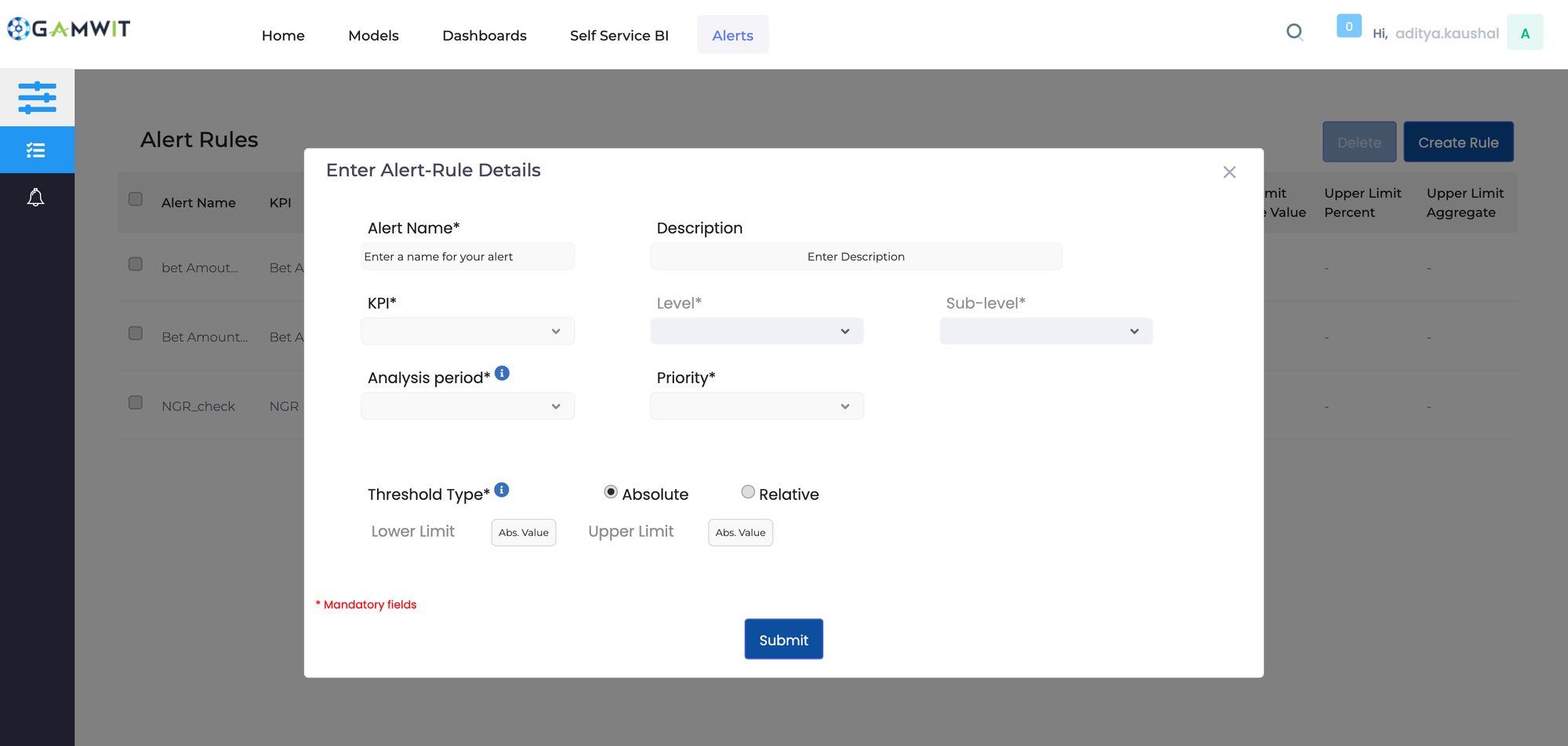
The rule form, as it is in the product. A KPI, the level it applies to, how often it is checked, its priority, and an absolute or relative limit.
Create Rule
KPI, Level (Overall Business or a loyalty category), Sub-level, Analysis period (daily, weekly or monthly), Priority, and a threshold that is absolute or relative.
Live screen from a licensed GAMWIT account.
This is sample data. In a walkthrough, we show KPI Alerts on your own numbers.
Book a walkthroughWhat changes
What changes when GAMWIT Alerts watch the metric for you
Same KPIs, same team. You find out weeks earlier.
When you find out
Without GAMWITIn the weekly or quarterly report, after the fact.
With GAMWITThe moment a KPI leaves the range you set in GAMWIT Alerts.
What you watch
Without GAMWITEverything, so nothing gets watched closely.
With GAMWITThe metrics that matter, with the rest kept quiet.
Who hears about it
Without GAMWITWhoever happens to open the dashboard.
With GAMWITThe right people, by email, app notification or SMS, with role-based access.
What happens to an alert
Without GAMWITIt is noticed, then lost in an inbox.
With GAMWITGAMWIT Alerts put it into a workflow and escalate it automatically if nobody addresses it.
Setting the threshold
Without GAMWITFixed and generic, so false alarms are common.
With GAMWITYours to define, down to conditions like below 80% for more than two hours.
How it works
How GAMWIT Alerts work
Why monitoring usually fails
Too much data, no priority
When everything is reported, the metrics that matter look the same as the ones that do not.
Response time
Finding the cause of a problem after the fact takes time, and the loss grows while you look.
Resources sit in the wrong place
Underperformance that surfaces late means budget and people stay committed to something that stopped working weeks ago.
Nobody owns the number
Without a shared, current view of each area, nobody quite owns the number.
Near real-time monitoring
GAMWIT sends an alert the moment a metric crosses a predefined threshold or moves outside its expected range, delivered by email, app notification or SMS. One screen shows every critical KPI and its status at a glance.
Custom thresholds
Granular KPIs across multiple dimensions, with limits you set, not a vendor default.
Management and escalation
GAMWIT Alerts are generated, managed and resolved in a workflow, and anything left unaddressed escalates on its own.
Integrations
GAMWIT Alerts connect to CRM, ERP, BI tools, databases and spreadsheets, importing and exporting in the formats you already use.
Security and compliance
Built for GDPR and CCPA, with logs and an audit trail for every action, so every action can be traced later.
Scale and mobile
A handful of KPIs or thousands, monitored from the desktop or from the mobile app.
See it with your team
See KPI Alerts set up for the questions your team asks.
Book a walkthrough with the GAMWIT team, or start a free trial and explore the platform first.
Getting started
What you need to get started
What it asks of your team
No data science team
Marketing, Finance, Risk and Compliance teams use it directly, without an analytics background.
Works with your data as it is
Wherever and however your gaming data is stored, the GAMWIT team handles the connection. See how GAMWIT connects
Runs on its own
Once connected, it keeps the view current without anyone running a report.
Recognized by the industry.
 FinalistCompliance Innovator of the YearVixio · 2024
 NominatedCompliance Technology ProviderEGR North America · 2024
 NominatedData and AI PartnerEGR B2B · 2022 · 2023
Run GAMWIT's KPI Alerts on your own data.
The KPI Alerts tool is already built. Connecting your data takes 2 to 4 weeks.
The nine models
- Player ChurnWho is likely to leave in the next seven days?See the model
- Player Lifetime ValueWhat is each player worth over a lifetime?See the model
- Early VIP PredictionWhich of this week's signups are on a VIP path?See the model
- Player FrequencyHow often will each segment come back this month?See the model
- Game RecommendationWhich game should each player be shown next?See the model
- Hold PercentageWhat share of each player's wagers do we keep?See the model
- Bonus Abuse PreventionWhich accounts are likely to work the promotion?See the model
- Responsible GamingWho needs a look before the regulator asks?See the model
- Anti-Money LaunderingWhich activity should the compliance team see first?See the model